
sales@wishworksmedia.com
386.308.3986
“Can you just grab my logo off my website?”
As a promotional products distributor, those are two things I never, EVER want to hear when accepting an order. Why? Because it’s just about impossible for me to imprint it for you. Let’s see why that is.
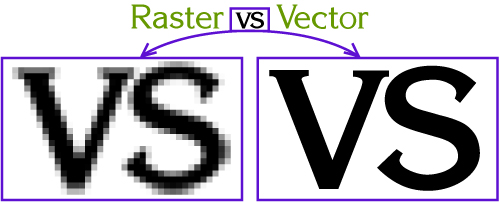
For it to be “good artwork” for imprinting, what’s required is “vector” artwork. Vector artwork is created through “mathematical defined” objects, like plotting points and drawing lines between them. The result is clean, crisp graphics are scalable, meaning that it will look essentially the same whether you use it at 1 inch or 100 inches. The graphic below on the left is a representation of a vector graphic (some resolution is lost because you are viewing it on a screen).
On the other hand, “raster” artwork is a bitmap image. Bitmap images are composed of a checkerboard type grid of squares and are usually used for photographic type images. The resolution is critical to resizing and working with them. Most web type images are 72 pixels per inch (very low resolution) and those used for high resolution printing can be as high as 300 or 600 per inch. If you grab a web image and then zoom in, you can see the squares.
High resolution vector art (.eps or Adobe Illustrator files) as shown on the left–as opposed to a bitmap image as shown on the right–are required for best imprint on your promotional products.
The reason the clean lines are needed is because ink imprinting your logo art is usually done with a silkscreen type process. Think of it as somewhat like a stencil. Now imagine you have to cut the stenciled design using the rough edge graphic shown on the right. Might be less than smooth edges for sure!
Your logo designer should be able to provide you with an Encapsulated Postscript (.eps), Adobe Illustrator (.ai), or a print production quality PDF file that you can pass along to your us. Once you have that, we can easily resize it to whatever imprint size you’ll need for your project. Word of caution: Do not try to “convert” a .jpg or .gif file to and .eps or .pdf format, thinking that it will magically turn into production ready artwork. It will not. It just converts the low res file into a file that can be read (not used) as an .eps or print ready .pdf.
If, for some reason, you cannot get a vector art file for your promotional product project, we can have it redrawn for you by a graphic artist. This will involve extra expense and time. So investing in hiring a designer to create imprint-ready artwork will save you time and dollars over the years.
And while we’re talking about graphic design, please do yourself, and your marketing image a favor by investing in an official logo for your business. This is the face you show to the world! If you need help we offer those services too.
Artwork created in another program and merely saved as one of these file extensions does not guarantee acceptable artwork (e.g. a JPEG saved in Illustrator® as an “AI” file does not make it a vector file).
The file formats below will NOT always be acceptable depending on the product being ordered and the quality of the submitted file. Art supplied as Raster may incur additional art charges.
Microsoft Paint, PowerPoint, Word and Publisher are not acceptable file formats for imprinting on product.
If the decorating method calls for spot color, your art should call out the color using the PMS colors from the solid coated swatch palette. Custom made colors should not be submitted. When four color process printing is the decorating method, files should be built as CMYK. Your CMYK (and grayscale) files should be 600 dpi (minimum 350). Bitmap should be 1200 dpi (minimum 600 dpi).
We recommend that all text be converted to curves/outlines by the originating program. This eliminates font problems associated with the variety of fonts with the same name. If this is not possible, include both screen and printer fonts with your files. We can only accept PC compatible fonts.
Need expert advice or
innovative concepts for your promotion?
Call us for a free consultation.
We have access to an extensive case-study library of award-winning
promotional ideas. Tell us about your event, marketing goals and
budget, and we’ll brainstorm cost-effective ideas and strategies
for you. We know what’s out there, what works, what the trends
are—and we love to help.
Stymied by logo logistics? Wishworks offers a range of graphic design services for your embroidery or imprinting needs. If you are starting completely from scratch and developing an entirely new brand identity; we can recommend graphic designers whose specialty is developing corporate identities. Just let us know what you need, we can help.
If you choose to have your logo embroidered and have not already had your logo digitized, we will need your art or logo sent to us electronically. For this decorating method, we can accept .JPEG. Once we have your art or logo we will digitize your logo.
Digitizing is the process of converting your hard copy logo or design to a “digitized” computer software embroidery file. Once your design is in this form a computerized embroidery machine can sew it out.
The actual process of digitizing your design is similar to C.A.D. (X – Y) programming. Each stitch, or grouping of stitches, is manually programmed by hand with the aid of the digitizing software.
If you do not have vector art, don't worry we will help you recreate what you do have into vector art.





Copyright / Wishworks Media
2009